
Blog
1. Introduction to Privileged Access Management (PAM)
1.1 What is Privileged Access Management (PAM)?
Privileged Access Management (PAM) is a cybersecurity approach designed to protect accounts that have special access rights to critical systems and sensitive data. These accounts, known as privileged accounts, can make important changes, access confidential information, or control key systems within an organization.
Privileged Access Management (PAM) helps organizations secure these accounts by applying strict controls on who can access them, how they are used, and for how long. It combines people, processes, and technology to manage, monitor, and record privileged activities, reducing the chances of unauthorized access or data breaches.
Privileged Access Management (PAM) is built around the principle of least privilege, which means giving users, applications, or systems only the minimum permissions they need to perform their tasks. This reduces the attack surface and limits the potential damage if credentials are stolen or misused.
In short, Privileged Access Management (PAM) ensures that only the right individuals have access to critical systems at the right time and for the right purpose, making it one of the most important parts of modern cybersecurity.
1.2 Evolution of Privileged Access Management (PAM)
In the early days of IT, organizations relied on simple username and password combinations to protect administrative access. As networks and systems became more complex, the number of privileged accounts grew, creating more opportunities for misuse or cyberattacks.
To address these risks, Privileged Access Management (PAM) tools were developed to secure and monitor administrative credentials. Over time, PAM evolved from basic password vaults to comprehensive security platforms that include password rotation, session recording, access approval workflows, and real-time monitoring.
Today, PAM is widely used across industries to meet compliance standards, prevent insider threats, and stop attackers from exploiting privileged credentials, a key entry point in about 80% of data breaches according to cybersecurity research.
1.3 The Role of Privileged Access Management (PAM) in Modern Cybersecurity Architectures
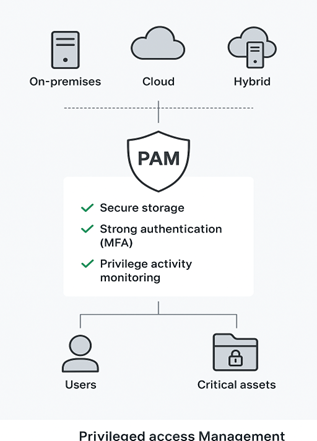
In modern organizations, Privileged Access Management (PAM) is essential for protecting sensitive systems, data, and accounts within an organization’s on-premises, cloud, and hybrid environments. Privileged accounts hold powerful permissions that can be exploited if not properly secured.
Privileged Access Management (PAM) serves as a protective layer between users and an organization’s critical assets. It ensures that privileged credentials are securely stored, access is granted only after strong authentication methods such as multi-factor authentication (MFA), and every privileged activity is thoroughly logged and monitored.
By enforcing the principle of least privilege, monitoring privileged sessions, and automating credential management, PAM strengthens overall cybersecurity, Without PAM, organizations face serious risks such as data breaches, insider misuse, and non-compliance with security regulations.
2. Core Concepts of Privileged Access Management
2.1 What Are Privileges and How Are They Created?
In information technology, privileges refer to the rights or permissions that allow a user, account, or process to perform specific actions within a system or network. These actions may include tasks such as installing software, changing configurations, creating user accounts, or accessing sensitive data.
Privileges are essential for system operations, as they enable users and applications to perform their necessary roles efficiently. However, they also pose significant security risks if misused, either accidentally or intentionally.
Privileges are typically built into operating systems, databases, applications, and cloud platforms. They can also be assigned manually by system administrators. Depending on the organization, privilege assignments may be role-based (for departments like IT, HR, or Finance) or based on other factors such as seniority, time, or location.
In simple terms, privileges define what a user or process is allowed to do and controlling them properly is key to preventing unauthorized or harmful actions.
2.2 What Is Privileged Access?
Privileged access refers to the ability to perform actions or access data that go beyond those of standard users. It gives individuals or systems elevated permissions to make critical changes, manage resources, or access sensitive information.
Privileged access is typically granted to administrators, system operators, or applications that need to manage IT systems. Because these permissions hold greater power, they must be carefully monitored and controlled using Privileged Access Management (PAM) to prevent misuse, data loss, or security breaches.
2.3 What Are Privileged Accounts? and Types of Privileged Accounts
A privileged account is any account that has permissions exceeding those of a regular user. These accounts can make system-wide changes, access restricted data, and manage other users or configurations.
Privileged accounts are powerful but risky, and if compromised, they can allow attackers full control over systems. Therefore, managing and monitoring these accounts is a critical function of PAM.
Types of Privileged Accounts:
- Local Administrative Accounts – Provide administrative control over individual devices or servers.
- Domain Administrative Accounts – Offer privileged access across all systems within a network domain.
- Break-Glass (Emergency) Accounts – Used during emergencies to access systems when normal accounts are unavailable.
- Service Accounts – Used by applications or services to interact with operating systems or databases.
- Service Principals (Cloud Identities) – Cloud-based accounts used by services or applications to access cloud resources.
- Application Accounts – Allow applications to access databases, run scripts, or communicate with other software.
- Active Directory / Domain Service Accounts – Manage tasks like password resets and network configuration changes.
In many cases, these accounts are machine identities rather than human users, such as those used by automation tools, AI systems, or robotic process automation (RPA). As these machine accounts increase, they create more complexity and make PAM even more essential.
2.4 What Are Privileged Credentials?
Privileged credentials (or privileged passwords) are authentication details that grant elevated access to systems, accounts, or applications. These credentials can belong to human users or non-human entities like applications and services.
Common examples include passwords, SSH keys, and API tokens that allow administrative access. In DevOps environments, these credentials are often called “secrets.”
Because privileged credentials act as the “keys to the IT kingdom,” they are highly valuable to cybercriminals. If stolen, they can be used to access critical systems and data without detection. Research shows that around 80% of security breaches involve compromised privileged credentials, making their protection a top security priority.
3. Benefits of Privileged Access Management
Privileged Access Management (PAM) provides multiple advantages that help organizations strengthen security, simplify operations, and ensure compliance with regulatory requirements. By controlling who can access sensitive systems and how they use that access, PAM plays a crucial role in minimizing both internal and external risks.
Below are the key benefits of implementing PAM:
- Enhanced Security
PAM improves an organization’s security by controlling who can access important systems and data. It ensures that only authorized users can log in to privileged accounts using strong authentication methods. By keeping privileged credentials safe, PAM helps prevent hacking, data breaches, and system misuse.
- Reduced Attack Surface
By giving users only, the access they really need, PAM limits the number of places attackers can target. Even if a hacker gets into one account, their ability to move around the system is restricted. This least privileged approach helps reduce the chances of a cyberattack spreading.
- Protection Against Malware and Insider Threats
Most malware needs admin rights to run. PAM helps stop this by blocking unnecessary admin access. It also keeps an eye on all privileged sessions, so if someone tries to misuse their access, the system can quickly detect and respond to it.
- Improved Operational Efficiency
Managing many privileged accounts manually can take a lot of time. PAM makes this easier by automating password changes, access approvals, and account setups. This saves time, reduces manual errors, and helps IT teams work more efficiently.
- Simplified Compliance and Auditing
Regulations like ISO 27001, GDPR, PCI DSS, and HIPAA require organizations to control privileged access and keep detailed logs. PAM helps by automatically recording user actions and creating audit-ready reports. This makes it easier to meet compliance standards and prove accountability.
- Better System Stability
Giving users too much access can cause mistakes or system issues. PAM limits privileges to prevent accidental changes and configuration errors. This keeps systems running smoothly and reduces downtime.
- Support for Cyber Insurance and Risk Reduction
Many insurance providers now require PAM as part of their cybersecurity requirements. Having PAM in place shows that the organization follows good security practices, which can help reduce risk and even lower insurance costs.
Privileged Access Management is more than a security control. By enforcing least privilege, automating credential management, and maintaining visibility over privileged activities, PAM empowers organizations to stay resilient against modern cyber threats.
4. Key Use Cases and PAM in Action
Privileged Access Management (PAM) is used in many real-world situations to improve security, reduce risks, and ensure compliance. Below are some key use cases where PAM plays an important role.
- Reducing the Identity Attack Surface
Today, many cyberattacks happen when hackers steal real user credentials instead of breaking through firewalls. PAM helps prevent this by securely storing all privileged passwords and credentials in an encrypted vault.
It follows the least privilege and zero trust principles, meaning users get access only to what they need, and every action must be verified. This stops attackers from moving freely across systems and makes it much harder for them to exploit stolen credentials.
- Managing Identities
In modern organizations, not only humans but also machines, IoT devices, bots, and AI tools have privileged identities. PAM helps manage all these identities in one place by:
- Centralizing credentials for both users and systems.
- Automatically rotating passwords to keep them secure.
- Monitoring sessions to detect unusual or suspicious activity.
This ensures that all privileged identities, whether human or non-human, are properly controlled and protected.
- Maintaining Regulatory Compliance
Many data protection laws like GDPR, HIPAA, and PCI DSS require organizations to control and monitor privileged access. PAM helps organizations meet these compliance standards by:
- Enforcing strict access policies so users can only access data relevant to their role.
- Recording all privileged sessions for auditing and reporting.
- Providing detailed logs that can be used to demonstrate compliance during security audits.
PAM in action helps organizations secure privileged accounts and reduce identity-based attacks, manage all types of privileged identities effectively, and simplify compliance with major data protection and security standards. It’s a powerful tool that strengthens cybersecurity and builds trust across the organization.
5.Privileged Access Management Best Practices
To make PAM truly effective, organizations should follow a few simple but important best practices. These steps help improve security, reduce risks, and make sure that privileged access is properly controlled and monitored.
- Assess All Privileged Accounts
Start by identifying all privileged accounts in your organization, who has access, what systems they can reach, and which credentials they use. This helps find hidden risks and unused accounts that could become security threats.
- Apply the Principle of Least Privilege
Give each user only access to entities that they need to do their job. This limits damage if an account is ever hacked or misused.
- Use a Secure Vault for Credentials
Store all privileged passwords, SSH keys, and API keys in a secure digital vault. This keeps them safe, encrypted, and accessible only through proper authorization.
- Enable Multi-Factor Authentication (MFA)
Add an extra layer of protection to all privileged accounts by requiring MFA. Even if a password is stolen, attackers still can’t log in without the second verification step.
- Use Just-in-Time (JIT) Access
Instead of giving permanent admin rights, grant temporary access only when it’s needed. Once the task is complete, access is automatically removed.
- Monitor and Record Privileged Sessions
Keep an eye on all privileged activities in real time. Recording sessions helps detect unusual actions and provides a clear audit trail for investigations.
- Regularly Review and Rotate Passwords
Change privileged passwords, after each use to prevent attackers from using old or stolen credentials.
- Limit Movement Across Systems
Remove unnecessary local admin rights from endpoints. This helps stop attackers from moving across systems if they gain access to one account.
- Protect Third-Party and Application Credentials
Secure accounts used by third-party tools, cloud services, and DevOps systems in the same way by vaulting and rotating them regularly.
- Train and Test Regularly
Train employees on PAM best practices and how to recognize phishing or credential theft attempts. Run periodic security tests or “red team” exercises to check how well your defenses work.
PAM best practices are about giving minimal access, securing credentials, monitoring activity, and continuously improving controls. Following these simple steps can greatly strengthen your organization’s security.
6. Conclusion
Privileged Access Management (PAM) is a critical component of modern cybersecurity, helping organizations secure sensitive systems, control privileged accounts, and reduce the risk of breaches. By enforcing least privilege, monitoring activities, and automating credential management, PAM not only strengthens security but also ensures compliance, operational efficiency, and protection against evolving cyber threats.
Article By: Sijada Kabeer – Presales Engineer – Cybersecurity
 +94 112 375 656
 info@apts.lk
 422/3,Galle Road, Colombo 3, Sri Lanka