
Blog
The Growing Threat of Ransomware: How to Protect Your Data
Introduction
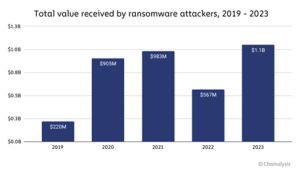
Ransomware has emerged as one of the most dangerous cybersecurity threats in recent years, targeting individuals, businesses, and even government institutions. This malicious software encrypts a victim’s files and demands a ransom for their release. With attacks becoming more sophisticated and costly, it’s crucial to understand how ransomware operates and the best practices for protecting your data.
The Rise of Ransomware Attacks
Ransomware has evolved from simple encryption-based attacks to highly organized cybercrime operations. Some of the most infamous ransomware incidents include:
- WannaCry (2017): This ransomware attack affected over 200,000 computers in 150 countries, exploiting a vulnerability in Microsoft Windows.
- Colonial Pipeline Attack (2021): A ransomware attack forced the largest fuel pipeline in the U.S. to shut down, causing widespread fuel shortages.
- REvil Ransomware: A sophisticated ransomware group responsible for numerous high-profile attacks, including breaches of IT management companies.
These incidents highlight the devastating consequences of ransomware, including financial losses, operational disruptions, and data breaches.
How Ransomware Works
Ransomware typically spreads through:
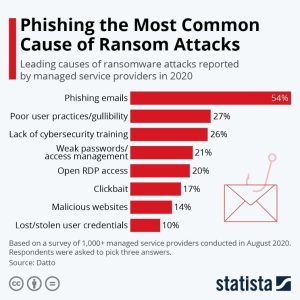
- Phishing Emails: Attackers use fake emails with malicious attachments or links to trick users into downloading ransomware.
- Exploiting Security Vulnerabilities: Hackers exploit weaknesses in outdated software or unpatched systems.
- Malicious Websites and Ads: Visiting compromised websites or clicking on infected ads can lead to ransomware infections.
- Remote Desktop Protocol (RDP) Attacks: Cybercriminals exploit weak or stolen login credentials to gain access to systems remotely.
Once ransomware infects a system, it encrypts files and displays a ransom note demanding payment in cryptocurrency. In some cases, attackers threaten to leak sensitive data if the ransom is not paid.
How to Protect Your Data from Ransomware
While ransomware threats continue to evolve, there are several proactive steps individuals and businesses can take to safeguard their data:
- Maintain secure backups of important files on external hard drives or cloud storage.
- Ensure backups are stored separately from the main network to prevent ransomware from spreading to them.
- Regularly update operating systems, applications, and security software to patch known vulnerabilities.
- Enable automatic updates whenever possible.
- Install reputable antivirus and anti-malware software.
- Use firewalls and endpoint security solutions to monitor network traffic and detect threats.
- Never open attachments or click on links from unknown or suspicious emails.
- Verify the sender’s authenticity before downloading files.
- Use MFA for email, cloud accounts, and remote access to add an extra layer of security.
- Restrict administrative access to only necessary personnel.
- Implement the principle of least privilege (PoLP) to minimize the risk of malware spreading.
- Disable Remote Desktop Protocol (RDP) if not needed.
- Restrict access to network services that are not essential.
- Have a cybersecurity response strategy in place to quickly contain ransomware attacks.
- Train employees on best security practices and how to recognize threats.
What to Do If You’re Infected by Ransomware
If you fall victim to ransomware, follow these steps:
- Disconnect from the Network – Immediately disconnect affected devices to prevent the malware from spreading.
- Do Not Pay the Ransom – There is no guarantee that paying the attackers will restore your files. Instead, contact cybersecurity professionals.
- Report the Attack – Notify law enforcement agencies, such as the FBI’s Internet Crime Complaint Center (IC3).
- Attempt Data Recovery – Use backup files or decryption tools from cybersecurity organizations.
Conclusion
Ransomware remains a growing threat in today’s digital landscape, but with proper cybersecurity measures, individuals and businesses can reduce their risk of infection. By staying informed, implementing robust security practices, and preparing for potential attacks, you can protect your data and minimize the impact of ransomware threats.
 +94 112 375 656
 info@apts.lk
 422/3,Galle Road, Colombo 3, Sri Lanka